

In the rapidly evolving landscape of workplace technology, artificial intelligence (AI) has emerged as a transformative force. Microsoft, a pioneer in productivity solutions, has introduced Microsoft 365 Copilot Chat, an AI-powered assistant designed to enhance efficiency, collaboration, and decision-making across organizations.
This blog post aims to provide an in-depth exploration of Microsoft 365 Copilot Chat, highlighting its capabilities, practical use cases, and the differences between its free and licensed versions.
What is Microsoft 365 Copilot Chat?
Microsoft 365 Copilot Chat is an AI-driven chat interface integrated within the Microsoft 365 ecosystem. Powered by advanced language models like GPT-4o, it enables users to interact with their data, documents, and applications through natural language prompts. Whether drafting emails, analyzing data, or generating reports, Copilot Chat serves as a versatile assistant to streamline various tasks.
Key Features of Copilot Chat
- AI Chat Grounded in the Web
- Powered by GPT-4o, providing intelligent responses based on web insights.
- Helps users research industry trends, analyze data, and generate content efficiently.
- Supports natural language processing, making interactions more intuitive.
- File Uploads & Analysis
- Users can upload Word, Excel, PDFs, and other documents for AI-driven insights.
- Copilot Chat can summarize, extract key points, and suggest improvements.
- Data visualization capabilities allow users to interpret complex datasets.
- Image Generation
- AI-powered image creation based on user prompts.
- Useful for marketing, presentations, and creative projects.
- Limits may apply during peak usage times.
- AI Agents for Task Automation
- Users can access AI agents directly within the chat.
- Agents can automate repetitive tasks, provide recommendations, and assist with workflows.
- Metered pricing applies for advanced agent functionalities.
- Enterprise Data Protection
- Ensures secure AI interactions for workplace use.
- Adheres to Microsoft’s compliance and governance policies.
- Provides IT controls for managing agent access and data security.
- Copilot Pages for Collaboration
- Users can create Copilot Pages to collaborate on content in real time.
- Supports adding AI-generated content, files, and web-based insights.
- Requires a SharePoint license for full functionality.
- Accessibility & Integration
- Available via Microsoft 365 apps (Teams, Outlook, Edge) and the web.
- Users can pin Copilot Chat for quick access.
- Works across desktop, iOS, and Android.
Practical Use Cases of Microsoft 365 Copilot Chat
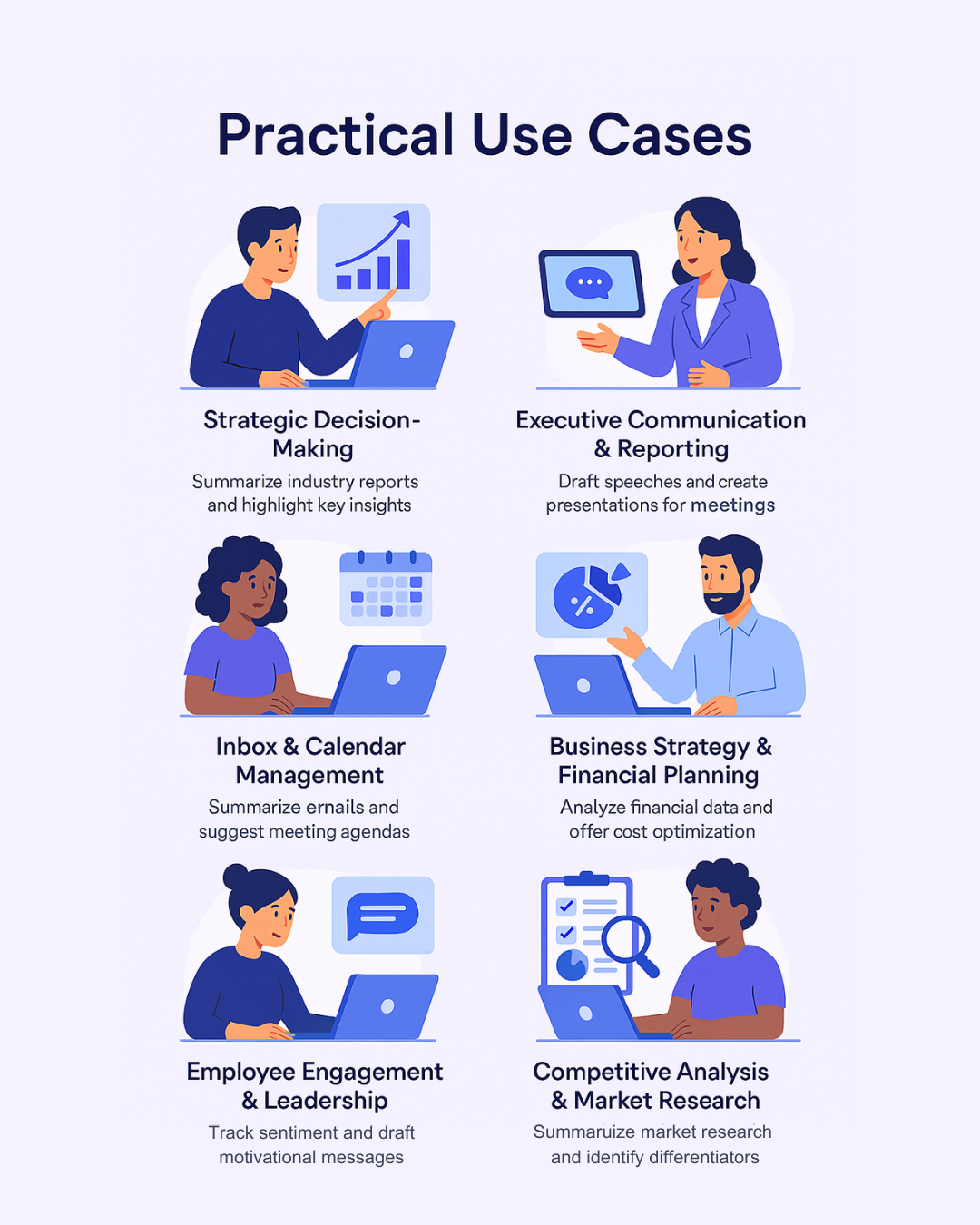
1. Strategic Decision-Making
Scenario: A business leader needs to analyze market trends before a quarterly strategy meeting.
Copilot Chat Assists By:
- Summarizing industry reports and highlighting key insights.
- Extracting relevant data from uploaded financial documents.
- Generating a presentation with key takeaways for stakeholders.
- Executive Communication & Reporting
Scenario: A CEO wants to draft a speech for an investor meeting.
Copilot Chat Assists By:
- Synthesizing financial performance data into a compelling speech.
- Creating a PowerPoint presentation with key metrics.
- Suggesting talking points based on uploaded reports.
- Inbox & Calendar Management
Scenario: A busy executive needs to prioritize emails and meetings efficiently.
Copilot Chat Assists By:
- Summarizing emails and chats related to key business topics.
- Identifying urgent action items and follow-ups.
- Suggesting meeting agendas based on previous discussions.
- Business Strategy & Financial Planning
Scenario: A CFO needs to reconcile financial data and accelerate period closing.
Copilot Chat Assists By:
- Analyzing uploaded financial reports and highlighting discrepancies.
- Providing data-driven recommendations for cost optimization.
- Automating forecasting models for strategic planning.
- Employee Engagement & Leadership
Scenario: An executive wants to improve employee engagement and well-being.
Copilot Chat Assists By:
- Integrating with Microsoft Viva to track employee sentiment.
- Suggesting personalized learning resources for leadership development.
- Helping draft motivational messages for internal communications.
- Competitive Analysis & Market Research
Scenario: A business leader needs to assess competitors before launching a new product.
Copilot Chat Assists By:
- Summarizing market research reports from uploaded files.
- Identifying key differentiators between competitors.
- Generating a SWOT analysis for strategic planning.
- Policy & Compliance Management
Scenario: A compliance officer needs to ensure adherence to new regulations.
Copilot Chat Assists By:
- Reviewing uploaded policy documents and highlighting key changes.
- Summarizing legal requirements for easy reference.
- Generating compliance checklists for internal audits.
Industry-Specific Use Cases for Copilot Chat

Whether you’re in healthcare or retail, education or manufacturing, Copilot Chat adapts to your context. It helps you cut through information clutter, automate repetitive tasks, and focus on what matters.
Here’s how leaders across industries are already using Copilot Chat with just their Microsoft 365 access.
🩺 Healthcare
Scenario: A hospital administrator needs to draft a compliance summary and review case notes for an internal quality audit.
How Copilot Helps:
- Summarizes long-form patient case reports into concise overviews.
- Reviews uploaded PDFs of clinical protocols and flags updates.
- Helps write SOP drafts and regulatory compliance checklists.
- Prepares internal memos using context from uploaded files.

💡 Also useful for: hospital communications, training material generation, scheduling emails.
🏗 Manufacturing
Scenario: A plant manager wants a safety audit report and insights from monthly QC spreadsheets.

How Copilot Helps:
- Reviews safety documentation and highlights key deviations.
- Uploads Excel QC logs and summarizes defect trends.
- Suggests improvements for production guidelines based on historical notes.
- Translates multilingual supplier documents into internal formats.
💡 Also useful for: summarizing process control records, vendor instructions, shift logs.
🛍 Retail & eCommerce
Scenario: A marketing head needs to draft seasonal campaign copy and analyze supplier pricing.
How Copilot Helps:
- Writes promo emails and ad headlines in seconds.
- Compares vendor quotes by summarizing uploaded price sheets.
- Helps plan campaigns using past performance data summaries.
- Brainstorms product descriptions and call-to-action ideas.

💡Also useful for: competitor research, customer review analysis, store operations manuals.
🎓 Education
Scenario: A faculty member is preparing new course outlines and responding to student queries.

How Copilot Helps:
- Drafts curriculum notes from uploaded course content or reference texts.
- Summarizes academic research or extracts key findings.
- Generates answers to student FAQs using uploaded syllabi or policy docs.
- Suggests improvements to lecture notes or assignments.
💡Also useful for: drafting institutional reports, emails to parents/students, creating exam review guides.
⚖ Legal
Scenario: A legal advisor needs to compare two versions of a contract and prep a summary for a client call.
How Copilot Helps:
- Compares two Word or PDF contract drafts and lists key differences.
- Highlights clauses related to liability, termination, or jurisdiction.
- Summarizes case law or legal opinions from uploaded briefs.
- Suggests draft language for policy updates or internal guidance.

💡Also useful for: reviewing NDAs, tracking changes in compliance documents, simplifying legal language.
How to start with Microsoft 365 Copilot
Microsoft offers two tiers of Copilot access. Here’s a breakdown to help you decide where you stand and what more you can do with a premium Copilot license.
| Feature | Microsoft 365 (Basic Access) | Microsoft 365 + Copilot License (Full Access) |
|---|---|---|
| Copilot Chat (Web-based) | ✔️ Included | ✔️ Included |
| GPT-4o Web-grounded Chat | ✔️ Included | ✔️ Included |
| File Upload & Document Summarization | ✔️ Word, Excel, PDF | ✔️ + Deeper app integration |
| Web Search & Content Research | ✔️ Yes | ✔️ Yes |
| Basic Drafting & Editing | ✔️ Emails, summaries | ✔️ + Full in-app document generation |
| Use in Outlook & Teams | ✔️ Side panel experience | ✔️ + Embedded in emails, meetings |
| Microsoft 365 Apps Integration | ❌ Not integrated in Word/Excel/PPT | ✔️ Copilot embedded in apps |
| Copilot Studio (Agent Builder) | ❌ Not included | ✔️ Build custom AI agents |
| Copilot in Word, Excel, PowerPoint | ❌ Not available | ✔️ Native in-app Copilot |
| Copilot Pages | ✔️ Limited (via chat) | ✔️ Full collaborative canvas |
| Image Generation | ✔️ With chat | ✔️ + Full creative workflow |
| Copilot Control System & Analytics | ❌ | ✔️ Admins get full visibility and control |
📌 What Can You Do Today With Just Microsoft 365?
Even without the additional Copilot license, you’re not left out. You can:
- Use Copilot Chat from the web or Teams to summarize files
- Ask for content drafts, comparisons, or translations
- Research topics and generate ideas for projects or planning
- Upload documents for analysis (Word, Excel, PDFs)
- Try simple automation and insights through conversation
🌐 Start here → copilot.microsoft.com
📌 What Will You Miss Without the Copilot License?
Here’s what requires the additional Microsoft 365 Copilot license:
- Full Copilot embedded inside Word, Excel, Outlook, and PowerPoint
- Automated document creation, not just summaries (e.g., “write a 2-page business proposal”)
- Copilot Studio access to build and manage custom AI agents
- Enterprise-level analytics, governance, and rollout control
- Advanced collaboration tools like Copilot Pages and cross-tool memory
- Access to Copilot Actions that execute workflows directly inside apps