

In today’s AI-powered workplace, the difference between generic output and real business value comes down to one skill: context prompting.
This guide shows how leaders can get more from AI by setting up clear, useful instructions – using Rajiv Khanna, VP of Sales as the example.
Why Context Prompting Matters
Many business users provide AI with vague, open-ended requests—and are disappointed with the results. These outputs often lack clarity, relevance, or strategic focus.
- Most AI responses are too broad or not business-ready
- Lack of context creates extra review and rework
- Context-rich prompts give faster, sharper results
With the right setup, AI can act as a high-performing assistant and not just a text generator.
Who Is Rajiv Khanna?
To make context prompting practical, we need a persona. Rajiv Khanna represents a typical sales leader who expects sharp, action-ready content.
- Role: VP of Sales, Manufacturing Tech firm
- Team: 12 Account Executives across 3 regions
- Focus Areas:
- Speed up deal cycles
- Enable sales team with usable content
- Win deals against tough competitors
- Prefers:
- Bullet points instead of paragraphs
- Quick playbooks instead of long docs
- Action-focused content
When prompting for someone like Rajiv, think like a business coach, not a content writer.
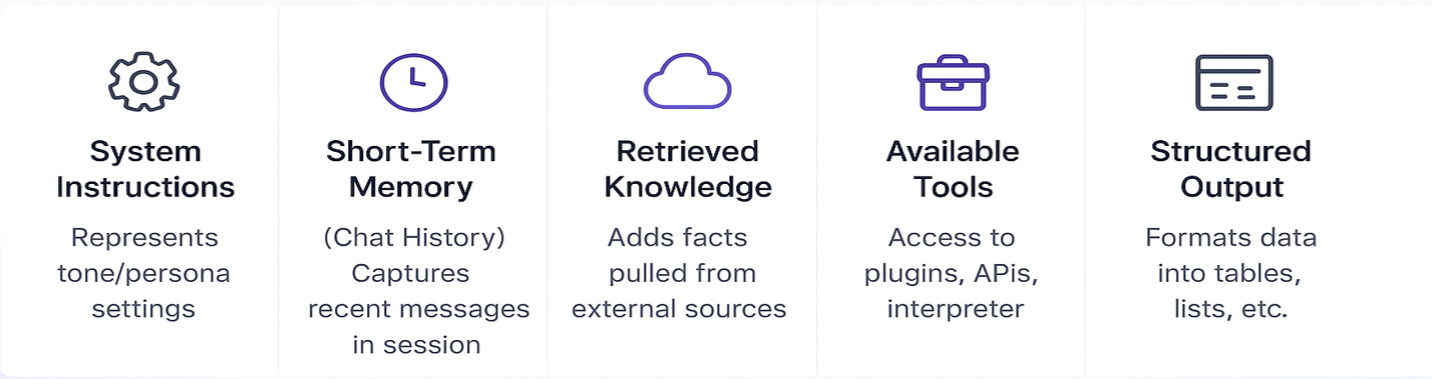
1. Define the Role in the Prompt
Start by identifying who the content is for and how they consume information.
“Create sales content for Rajiv Khanna, VP of Sales. Use a confident, clear tone. Format in bullets. Focus on practical outcomes.”
This helps AI stay aligned with the communication style Rajiv expects.
Write a Clear, Specific Prompt
Don’t just say “write something.” Spell out what should be included, and how it should be presented.
“Make a 1-pager with:
- 3 pain points in logistics
- 2 competitor gaps
- 3 proven objection-handling tips Use bold headers and bullet format. Keep it sales-ready.”
Specific prompts = faster, more useful outputs.
3. Use Conversation Memory (Short-Term)
If you’re working in a multi-step interaction, AI tools can remember past input during the session.
Mention:
- CRM rollout issues
- Regional sales trends
- Objection handling problems
This helps AI stay contextually aware and consistent with previous answers.
4. Provide Useful Inputs
Great output requires great input. Feed AI with business context:
- Product release notes for messaging
- Sales win/loss summaries for insights
- Competitive comparisons for positioning
- Past enablement decks for tone and format
The more relevant data you give, the more tailored the content becomes.
5. Store Key Preferences (If Memory Is On)
Some tools allow memory to persist across sessions. Use this to lock in:
- Format: always bullets
- Messaging: show ROI, not features
- Content: use real deal examples
Consistency in tone and format leads to quicker adoption by busy leaders.
6. Be Clear on Output Type
AI can generate many types of outputs. Be exact:
- Need a 3-slide summary? Say so.
- Want a call script? Specify the length and format.
- Looking for an email draft? Provide the CTA.
Avoid phrases like “summarize this” without defining the structure you need.
7. Use a Repeatable Prompt Template
To help your team prompt better, give them templates they can reuse.
“Create [asset] for Rajiv Khanna, VP of Sales. Audience: AEs. Goal: [e.g., help close deals]. Tone: confident and concise. Format: [slides, bullets, checklist]. Include [pain points, ROI proof, competitor notes].”
This saves time, ensures consistency, and reduces cognitive load.
What You Get with Context Prompting
The results are tangible:
- Better alignment with sales goals
- Less time editing AI outputs
- Stronger trust in AI content from leadership
- Faster enablement across teams
Done right, AI becomes part of your operating rhythm.
Final Word
Start with one real persona. Make the instructions detailed. Always define the audience and format. Focus on outcomes that matter.
Good context prompting is good business.
Want help setting up context templates for your teams? Start with Sales. Expand to Marketing and CX.